Roblox Assistant vs Third-Party AI Tools: What Each Does in 2026
What Roblox Assistant can do in 2026, what third-party AI tools add, and how to pick or combine them, with a fair comparison table and a simple workflow.
 The Klosmith teamPublished 9 min read
On this page
Roblox Assistant is the AI helper built into Roblox Studio: it answers questions, writes and edits scripts, changes parts and models, and can plan a feature before it builds anything. Third-party AI tools work from outside Studio instead, as coding agents, builder apps or plugins. Most creators get the most out of using Assistant for quick, in-place help and adding an outside tool only when a job needs something Assistant doesn't do.
Key takeaways
- Roblox Assistant lives inside Studio, with nothing extra to install. Roblox doesn't list a separate price for it (as of November 2026).
- Planning Mode lets Assistant write a plan you can edit. Nothing runs until you click Build.
- Outside tools connect through Studio's built-in MCP server or through plugins.
- Pick by the job: small edits suit Assistant, big multi-file systems suit coding agents, and builder apps suit people who want a finished feature.
- Klosmith starts from your own gameplay and builds an original game, and you can keep using Assistant on top of it.
This guide is for Roblox creators who want a straight answer about Roblox Studio AI in late 2026. Every claim about Roblox or another tool is linked to its source, with dates, because these tools change fast.
What Roblox Assistant is and what it can do now
Roblox Assistant started as a beta in December 2023 and became available to everyone using Studio in December 2024. You open it from the Assistant button on the right side of Studio's top bar. According to the Assistant for Studio guide on the Creator Hub, as of November 2026 it can:
- answer questions about Roblox and explain code you select
- create and edit scripts, including scripts it didn't write
- create, edit and delete instances, including changing properties on many parts at once
- search the Creator Store and insert assets
- restyle parts with a lightweight material generator
- generate a textured mesh from a text prompt or an image (up to 10,000 triangles by default)
- make simple procedural models (up to 50 in a rolling 24 hours, with up to 8 parts each)
Your chats are saved to the cloud and tied to the place you're working in. You can keep more than one chat going.
Roblox Assistant Planning Mode
Planning Mode arrived in April 2026, announced in the Roblox Newsroom post Roblox Studio is Going Agentic. Instead of building straight away, Assistant writes a plan first. The plan is a Markdown document you can edit, and nothing runs until you click Build. That makes it much easier to catch a wrong idea before it changes your game.
The same post announced a playtesting agent in beta that reads logs and plays your game as an automated tester. Roblox also shared one adoption number: between March 6 and April 7, 2026, 44% of the top 1,000 creators used Assistant or third-party AI tools through MCP.
Bring your own model, and what Roblox asks of you
Since February 2026, Assistant can use your own API keys from Anthropic, OpenAI or Google. Roblox says the keys are stored on your device. Using your own key means that provider bills you for what you use.
Two rules matter for every AI tool in this guide. First, Roblox's docs say you are responsible for the content generated within your games, and any text an AI writes for players must go through TextService filtering. Second, Roblox can use some creator data to train its models unless you opt out under Data Sharing in your Creator Hub settings. Read the AI data sharing page before you decide.
Here's what filtering looks like in a server script. It works the same whether you, Assistant or another tool wrote the text:
local TextService = game:GetService("TextService")

-- Returns text that's safe to show to every player, or nil if filtering fails.
local function filterForEveryone(text: string, author: Player): string?
	local ok, result = pcall(function()
		local filtered = TextService:FilterStringAsync(text, author.UserId)
		return filtered:GetNonChatStringForBroadcastAsync()
	end)
	return if ok then result else nil
end

return filterForEveryoneWhat third-party Roblox AI tools add
Outside tools fall into three groups. They don't replace Assistant; they cover different jobs.

Coding agents through the Studio MCP server
Studio now has a built-in MCP server. MCP is a standard way for an AI app to use tools in another program. The Studio MCP server docs list quick connections for Claude Code, Claude Desktop, Codex CLI, Cursor, Gemini CLI, VS Code and Antigravity. Once you turn it on from Assistant's menu (Manage MCP Servers), an agent can read scripts, edit several files, run Luau, start and stop a playtest, and read the console.
This suits experienced developers working on big systems across many files. Roblox's own warning is worth repeating: only connect clients you trust, because they can read and change your open places.
Files, Git and your own editor
Rojo is an open-source tool that lets you write scripts as normal files in an editor such as VS Code, keep them in Git, and sync them into Studio. It isn't an AI tool by itself, but many developers pair it with an AI coding agent in their editor.
AI game builders and plugins
Some apps aim to build whole features for you. Here's what each one says about itself, as of November 1, 2026:
- Ropilot describes a desktop app, a Studio plugin and Blender support. Its site lists free starter credits, a Plus plan at $20 a month, credit packs from $8, or the option to connect your own Claude or ChatGPT plan.
- SuperbulletAI describes an AI game builder for Windows that works with Studio and Rojo, generating UI, animations, VFX, 3D builds and game logic. We couldn't load its current pricing, so check its site.
- RoStudio describes a Studio plugin that builds systems and UI from a description, with a free tier, Starter at $7.99 a month for 400 credits and Plus at $19.99 a month for 1,200 credits.
Roblox Assistant vs third-party AI tools: side by side
This table compares what each option is built for. Prices and features are as each publisher states them on November 1, 2026.
| Tool | Setup | What it builds | Where it runs | Inside Studio | Cost model | Strengths | Limits |
|---|---|---|---|---|---|---|---|
| Roblox Assistant | Nothing to install | Scripts, instances, meshes, materials, simple models | Roblox Studio | Yes | No separate price listed; usage limits may apply | Knows your place, plans before building | Daily limits aren't published |
| Coding agent via MCP | Turn on MCP, connect a client | Multi-file code, playtests | Your computer, connected to Studio | No | The agent's own plan or API usage | Big refactors, any editor | Needs setup and coding knowledge |
| Rojo + editor | Install Rojo and its plugin | Whatever you or your AI write | Your editor, synced to Studio | No | Free, open source | Files, Git, real code reviews | Not AI by itself |
| Ropilot | Desktop app and plugin | Code, UI, models, thumbnails | Desktop app, Studio, Blender | No | Starter credits, $20/month, packs from $8 | Many asset types in one place | A separate app to learn |
| SuperbulletAI | Windows app | UI, animations, VFX, builds, logic | Desktop app with Studio and Rojo | No | Check its site | End-to-end feature building | Windows download; pricing not confirmed |
| RoStudio | Studio plugin | Systems and UI | Studio plugin | Yes | Free tier, $7.99 and $19.99 a month | Works from inside Studio | Models and sound listed as coming soon |
| Klosmith | Website and Studio plugin | An original game, step by step | Web app, synced to Studio | No | Plans with usage-based credits | Starts from your own gameplay; originality checks | Built for making new games, not editing existing ones |
Which one to use when
There's no single "best AI for Roblox". The right tool depends on what you're making and how much code you already know.
- Beginners: start with Roblox Assistant. Ask it to explain scripts, use Planning Mode for anything bigger than one script, and read each plan before you click Build. You'll learn faster if you ask "why" as often as "make".
- Intermediate creators: keep Assistant for quick changes. When a feature grows past a few scripts, try a coding agent through MCP, or a builder app if you want UI and assets made for you.
- Experienced developers: pair Rojo, Git and a coding agent for large systems and code review, and use Assistant for in-place tweaks and mesh or material generation.
Where Klosmith fits
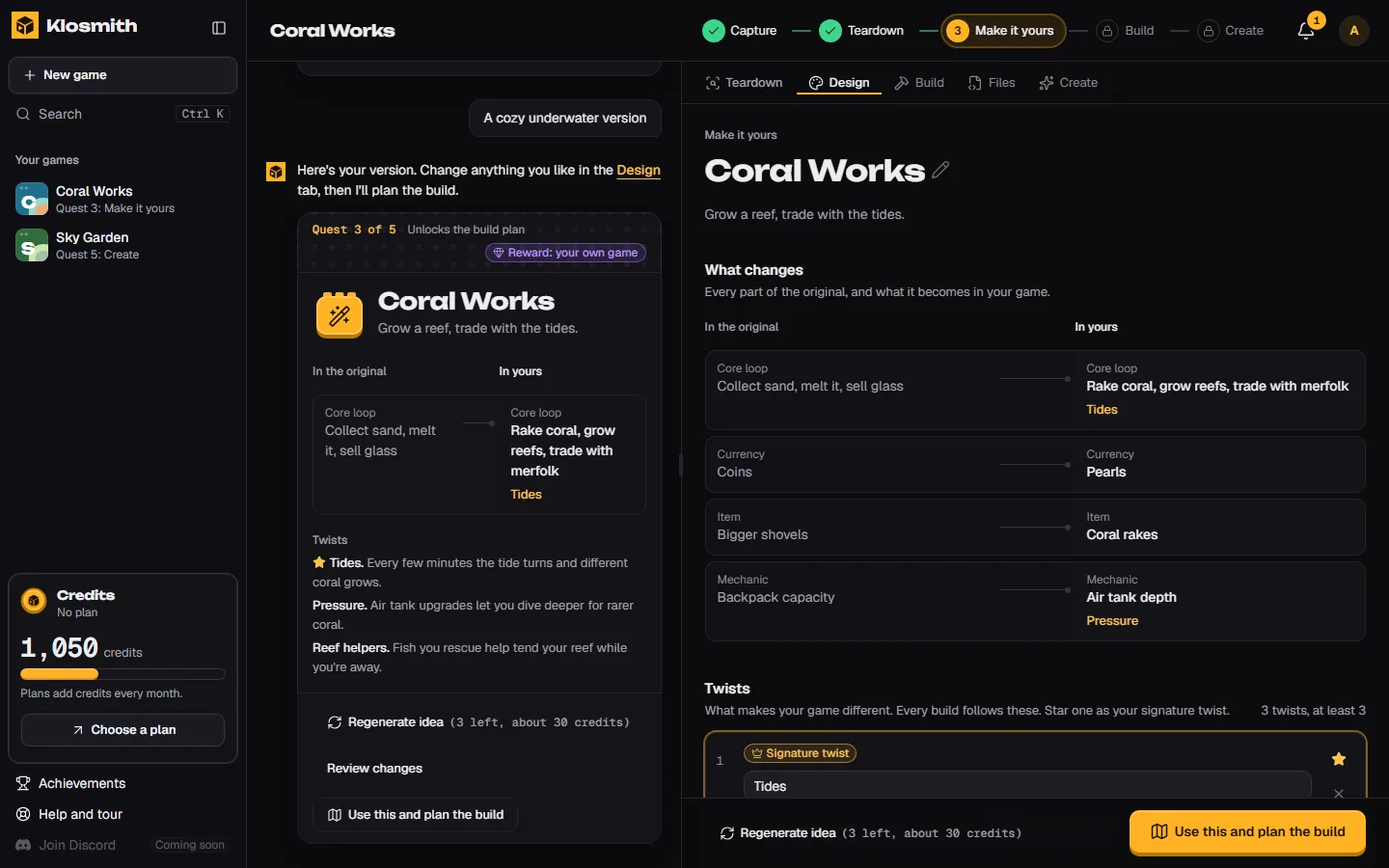
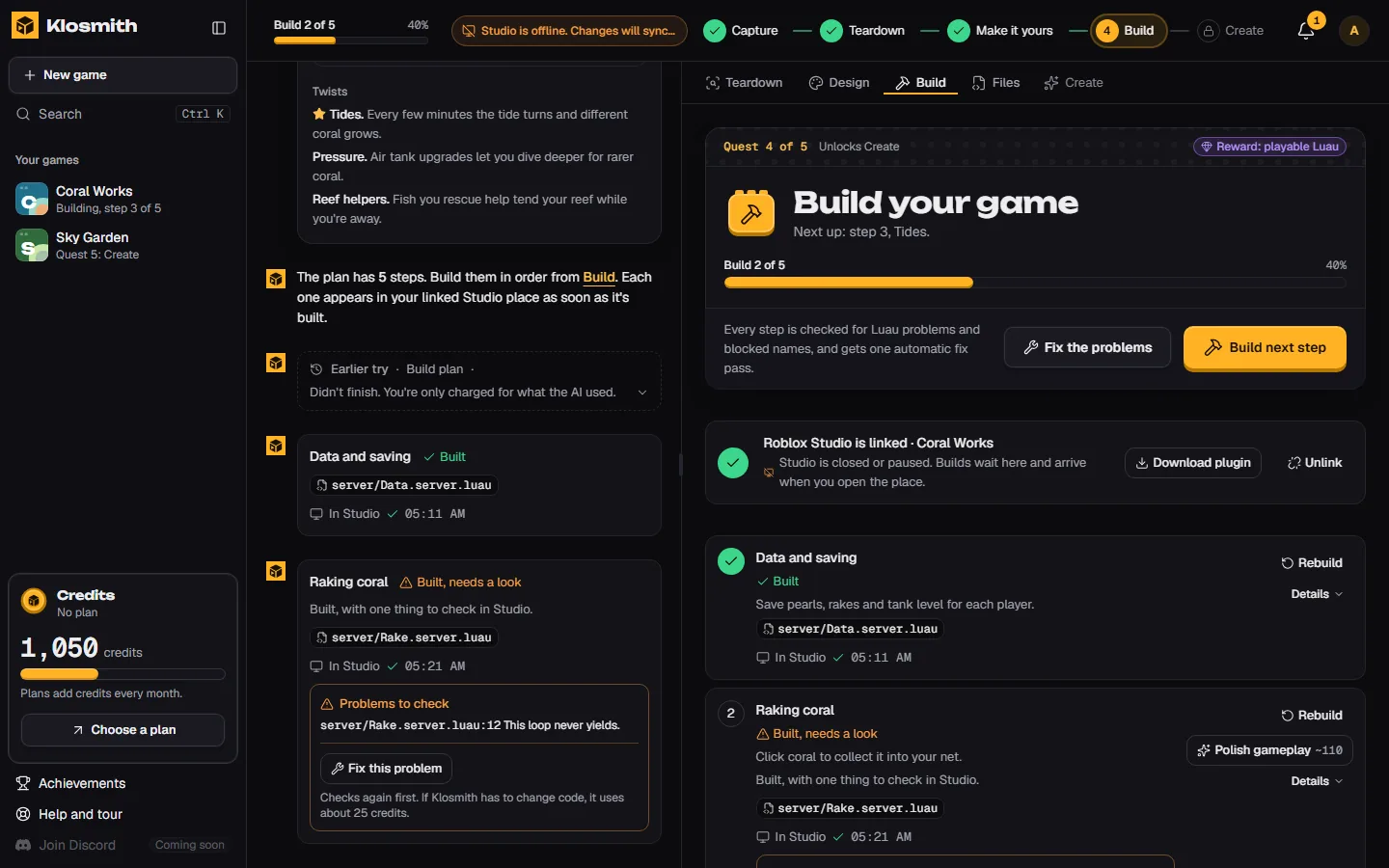
Klosmith solves a different problem: turning a game you love into an original game of your own. You record your own gameplay in Klosmith. It runs a Teardown of what makes that game fun, helps you make it yours with twists and an original name, and checks your code for blocked names from the original. Then it builds the game step by step as real Luau and syncs it into Studio through the Klosmith Sync plugin.
Klosmith and Assistant work well together. Klosmith only ever replaces or removes things it made, so the edits you make with Assistant stay put. Each Klosmith sync is one undo step (Ctrl+Z). You can read how Klosmith turns your gameplay into an original game on our homepage, or see Klosmith's plans and credits.
How to use Roblox Assistant and other AI tools together
Here's a workflow that keeps each tool on the job it does best.
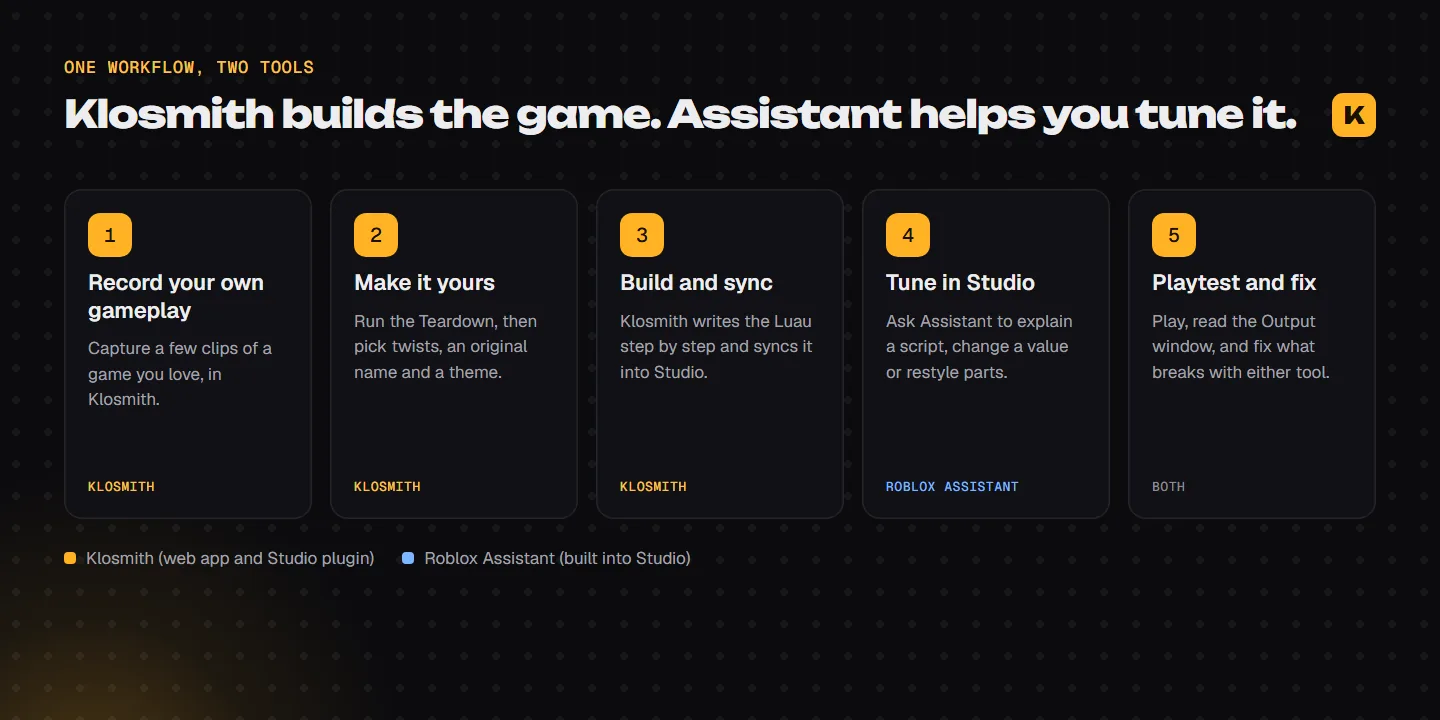
Start from your own idea
Record a few clips of a game you enjoy in Klosmith, or plan a feature in Assistant's Planning Mode if you're adding to an existing place.
Make the big pieces
Let Klosmith build the core game, or use a coding agent through MCP for a large system that spans many scripts.
Tune it in Studio
Ask Assistant to explain a script, change a value, restyle parts or generate a mesh for a prop.
Playtest after every change
Press Play, read the Output window and fix errors one at a time. Undo a whole sync with Ctrl+Z if something goes wrong.
Review before you publish
Read the code that matters (saving, purchases, chat), filter any player-facing text, and check your game follows Roblox's rules.
Common mistakes to avoid
- Letting two tools edit the same script at once. Finish one change, playtest, then move on.
- Skipping the plan. Planning Mode exists so you can catch a wrong idea before it touches your place.
- Connecting tools you don't trust. An MCP client can read and change your open places.
- Shipping code you haven't read. Data saving and purchases deserve a human check every time.
- Copying another game. AI makes copying fast, and copying is still copying. Change the core idea, the names and the look.
AI tools for Roblox will keep changing. At RDC 2026 in September, Roblox said a Scene Generator is coming later this year, as described in RDC 2026: The World Needs More Play. We'll update this guide as things ship. For more, browse more guides on the Klosmith Blog.
Frequently asked questions
Sources
- Assistant for Studio, Roblox Creator Hub. Accessed Nov 1, 2026.
- Roblox Studio is Going Agentic, Roblox Newsroom. Accessed Nov 1, 2026.
- Connect to the Roblox Studio MCP server, Roblox Creator Hub. Accessed Nov 1, 2026.
- Creator Roadmap 2026: Spring Update, Roblox Developer Forum. Accessed Nov 1, 2026.
- Studio MCP Server Updates and External LLM Support for Assistant, Roblox Developer Forum. Accessed Nov 1, 2026.
- [Full Release] Use Assistant to Boost Your Productivity, Roblox Developer Forum. Accessed Nov 1, 2026.
- Introducing Assistant in Studio [Beta], Roblox Developer Forum. Accessed Nov 1, 2026.
- AI tools in Roblox Studio, Roblox Creator Hub. Accessed Nov 1, 2026.
- AI Data Sharing, Roblox Creator Hub. Accessed Nov 1, 2026.
- RDC 2026: The World Needs More Play, Roblox Newsroom. Accessed Nov 1, 2026.
- Rojo, Rojo. Accessed Nov 1, 2026.
- Ropilot, Ropilot. Accessed Nov 1, 2026.
- SuperbulletAI, Superbullet Studios. Accessed Nov 1, 2026.
- RoStudio, RoStudio. Accessed Nov 1, 2026.

The Klosmith team
Makers of Klosmith
We build Klosmith, a tool that turns your own Roblox gameplay into an original game you build step by step in Roblox Studio. We write guides about making Roblox games, using AI responsibly and shipping your first game.